

Most images now feel like they have the touch of AI, where they feel too perfect. Sometimes the image looks clean, the lighting checks out, and the subject seems real. It is time to start doubting the content and do a deeper dive. I’ve been looking at image files for a long time, and one of the first things I check on a suspicious photo is the EXIF data. It’s not foolproof, but it’s fast and often tells you whether you’re dealing with a real capture or something that was generated.
Where the Data Comes From
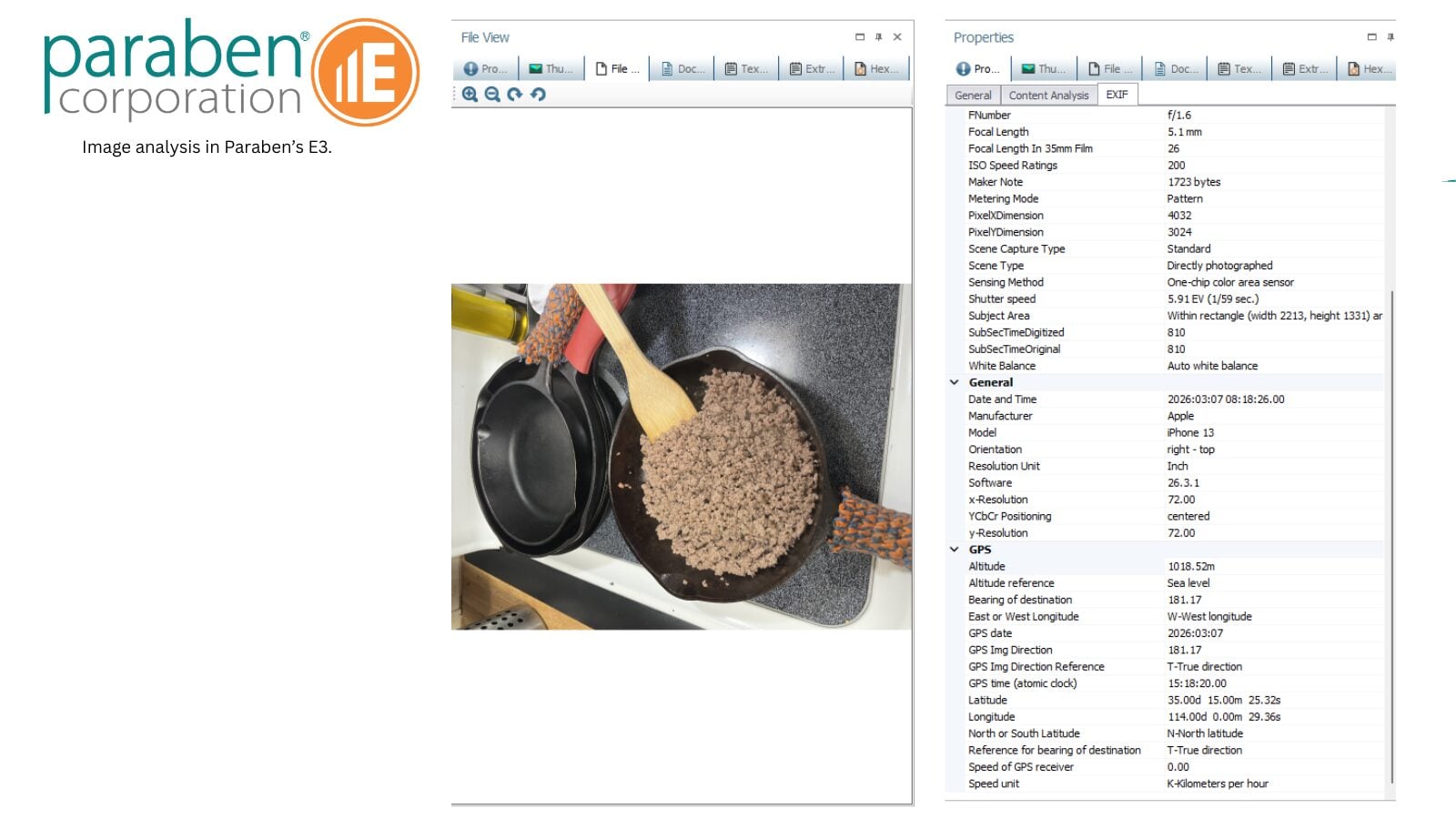
When a real camera or phone takes a photo, the device writes a bunch of information into the file at the moment of capture. This includes the camera make and model, lens details, exposure settings, the exact time the photo was taken, and sometimes GPS coordinates. That information gets embedded automatically by the hardware and firmware.
AI image generators work differently. They don’t have a sensor or a lens. They create the image from patterns learned during training. Any metadata that ends up in the file is usually added later by whatever tool or platform generated it. Because of this, you’ll often see missing fields, odd software tags, or no camera information at all.
Some generators now include C2PA credentials or specific XMP data that basically says “this was made by AI.” Others leave almost nothing behind. Either way, the metadata rarely looks like it came from an actual camera. That lack of information can be a good red flag to keep diving in for more information.
What to Look For
When I pull metadata on an image, I’m usually checking a few things:
- Are the camera make and model fields populated, and do they make sense?
- Is there any mention of generative tools in the software or creator fields?
- Are there C2PA tags present? (https://c2pa.org/)
- Do the timestamps and any location data line up with what’s being claimed?
I’ve seen cases where an image had no EXIF data whatsoever, which immediately raised questions. In other cases, the file had metadata, but it pointed to an editing program rather than a camera. These aren’t automatic proof of manipulation, but they’re useful signals that something might be off.
It’s also worth noting that social media platforms and messaging apps often strip or alter metadata when images are uploaded or shared. So, consider the source of the image when you start diving in. The absence of data doesn’t always mean the image was AI-generated it could just mean it went through a platform that strips out some of that information.
Free Tools Worth Using
There are several free tools that make this kind of checking fairly straightforward:
- ExifTool is still the most reliable option for pulling detailed metadata. It works from the command line and handles batch processing well.
- FotoForensics gives you both metadata and Error Level Analysis in one place, which can help spot areas that were added or altered after the original file was created.
- JPEGsnoop is good for looking at compression details and quantization tables.
- Forensically is a browser-based option that includes metadata, ELA, and noise analysis.
- MediaInfo is quick for getting a technical overview of the file.
- https://image-meta.com/ a new comer that takes a very interesting approach.
For a faster check on AI-related markers, the detector at ExifReader.com can flag C2PA credentials and some generative tool signatures.
A Few Practical Notes
Metadata analysis works best as an early step, not the final answer. People can remove or alter EXIF data, and some newer generators are getting better at producing cleaner files. That’s why I usually combine this with reverse image searches and a visual check for things like inconsistent shadows, strange reflections, or text that doesn’t quite make sense.
In my experience, the strongest results come from looking at multiple indicators together rather than relying on any single one. Metadata might tell you the file didn’t come from a camera. Visual inspection might show physical impossibilities. And OSINT work might reveal where the image actually originated.
Using EXIF and Metadata in OSINT and Forensic Verification
When examining a suspicious image:
- Extract and review core EXIF fields — Look for camera make/model consistency with the claimed source. Real photos from a specific device should show matching device identifiers across multiple images. AI images often show blank or mismatched fields.
- Check for generative tool signatures — Fields like “Software,” “CreatorTool,” or prompt-related parameters (in some generators) can directly reveal AI involvement.
- Examine C2PA Content Credentials — Increasingly adopted by platforms (OpenAI, Adobe Firefly, LinkedIn, Meta), C2PA provides cryptographically signed provenance data. Presence of these credentials can confirm AI generation or editing.
- Cross-reference with other metadata layers — JPEG quantization tables, compression signatures, and thumbnail inconsistencies can reveal post-generation processing or compositing.
- Combine with OSINT techniques — Perform reverse image searches (Google, TinEye, or specialized tools) to trace origins. Compare claimed capture dates/locations against EXIF timestamps and geolocation data. Inconsistencies often surface quickly.
If you’re dealing with something that could end up in a report or legal matter, document what you find and how you found it. These small details matter when you need to explain your process later.

Forensic-Impact Articles

Blockchain Forensics Is Only the Beginning
Bridging On-Chain Analysis, OSINT, and Digital Evidence Guest Blogger: Matthew Stern Cryptocurrency investigations are often described as the virtual equivalent of “following the money.” Public blockchains such as Bitcoin and Ethereum give investigators an unusual...

Building an Autonomous Network Honeypot & Deception Matrix
Guest Blogger: Fuzuyise Khoza 1. INTRODUCTION TO LOCAL NETWORK DECEPTIONTraditional network defense mechanisms operate reactively, relying on alert signatures after a system breach has occurred. In low-resource enterprise infrastructures or high-risk operational...

How Government Buyers Can Verify Digital Forensics Vendor Provenance: A Practical Guide
When government agencies buy digital forensics tools, they aren't just buying software. They're investing in the integrity of evidence that can affect people's liberty, national security and public trust. Recent federal attention to supply chain and foreign-adversary...
Trackbacks/Pingbacks