


Many times, when we do digital forensics, we have a very difficult time finding a starting point for our investigation. It is just a mad dash for data and we are not always able to maintain perspective as we begin weeding through all the information.
In a few of our cases we have found that this became the most critical information and wanted to devise a better way to review this information. The typical case scenario always involved a smartphone, and a vehicle. In a moment while on a phone the suspect was in an accident and the charges associated with the car accident change based on being on a mobile device or not. Since, the ability of doing vehicle forensics is limited by a variety of factors we had to take a different perspective on the data. That is when we decided to go to the other primary evidence of the smartphone.
The smartphone keeps a log of almost every action of the user or attempted by the user and in the case of an incident can become the best first-hand witness. We used the E3 Platform version 2.0 and the new activity timeline function to put the details together.
The Activity Timeline is currently available for Android 5.0 and higher. It is a separate process that can be selected in the Custom Acquisition option (Seen below) or can be done as part of a typical forensic examination. In the process for the Activity Timeline the investigator must give the access rights for all of the system information to be captured. This is not unheard of based on the new features in smartphones and changes in firmwares. The steps for the toggle are seen below. At the end of the process the process is removed from the suspect device.

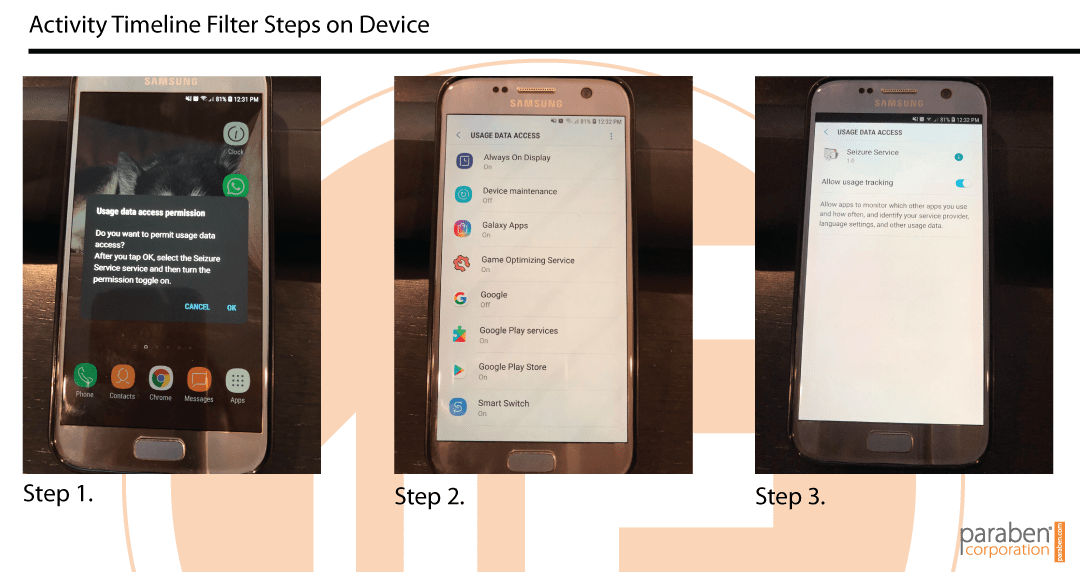
Once you capture and acquire the information the process of determining what is active user functions vs. system functions is the next barrier. Typically, the data is broken into the following areas:
- Time: Date and time of the action
- Application Name: Name of the application which was running on the device
- Internal Application Name: Unique identifier of the application which was running on the device at the certain date and time
- Internal Activity Name: Internal name of the activity performed on the device at the certain date and time, for example: com.android.launcher2.Launcher, com.samsung.sdm.ui.ActivationFail
- Type: Event types (constants of API level 21) representing the application state change, such as:
- Move to background (the user did not interact with the application at the certain time, the application moved to the background either because the user started using another application or because the user stopped interacting with the device and the screen is turned off).
- Move to foreground (the user interacted with the application at the certain time, for example opened it and started using).
- Configuration change (the device configuration was changed).
- None (it means that none of the above event types is applied to the application in question).
An example of the data on a device can be seen in the screen shot below from the E3 Platform version 2.0.
The biggest barrier is that the data captured will change based on the use of the user of the device. If they are a heavy user the data recovered would be limited to a smaller time frame of a week. If the device is not in heavy use the data retained can represent a month. This data captured with the Activity Timeline represents the active actions of the user of the device, it is much easier to determine if a device would have been in use at the time of an accident.


“
52 percent of all wrecks, drivers had been on their phones. –Cambridge Mobile Telematics
Related Articles

The Four Foundation Questions of Digital Forensics
In digital forensics, technology moves at lightning speed and lately at GPU speed as well. Apps, encrypted mobile operating systems, cloud artifacts, and complex IoT devices change almost daily. Yet, despite this constant evolution, the core foundation of legally...

Before Direct NAND Acquisition: Diagnosing an Undetectable Monolithic SD Card
Guest Blogger: Yevgeniy Kapishon | Aesonlabs Data Recovery Undetectable Is a Symptom, Not a Diagnosis When an SD card is not detected by a computer, reader or recovery system, the failure is often attributed immediately to the controller or NAND flash memory. With...

How OSINT Supports Compliance and Due Diligence
Guest Blogger: Issam Hanbali Open-source intelligence, commonly known as OSINT, is often associated with cybersecurity investigations, digital forensics, threat actor research, and online reconnaissance. However, OSINT also plays an increasingly important role in...